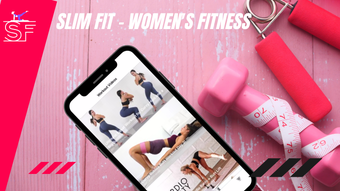

Slim Fit – Women’s Fitness Workouts
Overview
Slim Fit is a desktop application designed to support women in achieving their fitness and wellness goals through structured gym and home-based workout routines. The software serves as a comprehensive lifestyle companion, offering curated content tailored specifically to women’s health and fitness needs. It addresses common challenges such as lack of time, inconsistent routines, and difficulty finding reliable resources by centralizing workouts, nutrition guidance, and progress tracking in one accessible platform.
Target users include women seeking to improve strength, tone their bodies, lose weight, or maintain overall wellness through consistent exercise and healthy habits. The app is particularly suited for individuals who prefer guided routines, whether in a gym setting or at home. Real-world usage scenarios include daily 20-minute home workouts, meal planning based on fitness goals, and visual progress tracking using the built-in before-and-after photo tool.
Developed by Slim Fit, the application reflects a focused commitment to women’s fitness with an emphasis on accessibility and user engagement. The software integrates workout videos, exercise demonstrations, and educational content to promote long-term adherence to healthy lifestyles.
Key Features & Capabilities
- Workout Videos – Access a library of exercise videos covering butt workouts, ab routines, glute training, squats, sit-ups, and stretching. These are designed for various fitness levels and can be used in gyms or at home.
- App-Guided Workouts – Step-by-step guided sessions that demonstrate proper form and technique for key exercises, helping users avoid injury and maximize effectiveness.
- Meal Plans & Nutrition Guidance – Receive structured meal plans and articles on nutrition, weight loss, and healthy eating, all tailored to fitness objectives.
- Fitness Library – Exclusive access to longer workout videos, complete meal plans, and professional content from certified trainers, available only within the app.
- Progress Tracking – Use the before-and-after photo tool to visually monitor physical changes over time, reinforcing motivation and goal setting.
- Shop Integration – Purchase supplements, exercise equipment, and branded Slim Fit merchandise directly through the application.
These features support a holistic fitness journey by combining physical training, dietary planning, and mental motivation. For example, a user can begin a morning routine with a guided 15-minute glute workout, follow it with a breakfast plan from the app’s nutrition section, and later review their progress via the photo tracker. The integration of shopping functionality further enhances user convenience by providing direct access to fitness-related products.
User Interface, Workflow & Performance
The user interface of Slim Fit appears designed for clarity and ease of navigation, with a focus on intuitive access to core features such as workout videos, meal plans, and progress tools. Menus and sections are likely organized by category—workouts, nutrition, library, and tracking—allowing users to quickly locate desired content. Navigation is expected to be straightforward, minimizing the learning curve for new users.
Workflow efficiency is enhanced by the app’s integration of guided sessions and visual tracking, enabling users to maintain consistency without needing external coaching. The application’s performance is expected to remain stable during video playback and interactive sessions, though exact resource usage details were not specified. The developer did not provide information on CPU or RAM consumption during operation.
Stability during extended use and responsiveness across different screen sizes are likely optimized for desktop environments. General performance observations are based on typical behavior of similar desktop fitness applications, but specific benchmarks were not provided.
Compatibility & System Requirements
Slim Fit is available for both Windows and Mac operating systems, making it accessible to a broad range of desktop users. The software version is 1.0.0, with a file size of 200 MB, indicating a lightweight installation suitable for most modern machines.
Exact system requirements were not listed by the developer. Compatibility information is limited to the supported platforms. Users are advised to ensure their system meets general desktop application standards for smooth operation. The developer did not specify minimum hardware requirements such as processor speed, RAM, or storage space.
Pros and Cons
Pros
- Comprehensive content tailored specifically for women’s fitness and wellness
- Integrated workout videos and app-guided routines for all skill levels
- Visual progress tracking with before-and-after photo tool
- Access to exclusive Fitness Library content
- Direct shopping integration for fitness products and merchandise
- Free to download and use with no upfront cost
Cons
- Exact system requirements and performance metrics were not provided
- Limited information on offline functionality and data privacy policies
- Compatibility with older operating systems is not confirmed
- No mention of update frequency or automatic update features
- App may require a stable internet connection for full functionality
FAQ Section
Is Slim Fit available for Windows and Mac?
Yes, Slim Fit is compatible with both Windows and Mac operating systems, allowing users on either platform to access its fitness tools and content.
Is the software free to use?
Yes, Slim Fit is available at no cost. There are no subscription fees or in-app purchases required for basic access to workout videos, meal plans, and progress tracking.
Can I use Slim Fit without an internet connection?
While the app likely supports some offline features, such as viewing downloaded workout videos, full functionality—including access to the Fitness Library and live updates—requires an internet connection.
Does Slim Fit offer regular updates?
The developer has not specified the update frequency. However, the initial release version is 1.0.0, suggesting a stable launch with potential future improvements.
Is my personal data secure when using Slim Fit?
The developer did not provide detailed information about data handling or privacy practices. Users are advised to review the app’s terms of service and privacy policy for specific details on data protection.
Final Thoughts + CTA
Slim Fit stands out as a dedicated desktop solution for women focused on fitness, offering a rich blend of guided workouts, nutrition guidance, and visual progress tracking. Its user-friendly interface and comprehensive feature set make it a practical tool for anyone seeking to build sustainable habits at home or in the gym. While some technical details remain unspecified, the app’s free access and targeted content deliver strong value.
It is ideal for women who want a centralized, visually engaging platform to manage their fitness journey without relying on multiple third-party apps. The integration of shopping and exclusive content adds practical convenience, enhancing the overall user experience.
Download Slim Fit now to start your journey toward a stronger, healthier you.







